FotoGrids vs FooGallery

FooGallery has one of the better free tiers in WordPress galleries, and it doesn’t play games with its pricing. Where it stops is the gallery itself: grid and slider layouts, image filters, filtering and video are all PRO, there is no template library, and no version of it reports on your galleries.
FotoGrids
0
Analytics FooGallery offers at any tier
$89.99
The FooGallery social add-on, included in no PRO plan
30+
Templates in FotoGrids Free; FooGallery ships none
3
FooGallery paid tiers, before the add-ons
15
15

15 features FooGallery sells separately — or doesn't offer at all — are free in FotoGrids.

Why FotoGrids

Four reasons to pick FotoGrids over FooGallery

FotoGrids
FooGallery
Starting a new gallery
FotoGrids
30+ ready templates in Free
FooGallery
No template library — every gallery starts from defaults
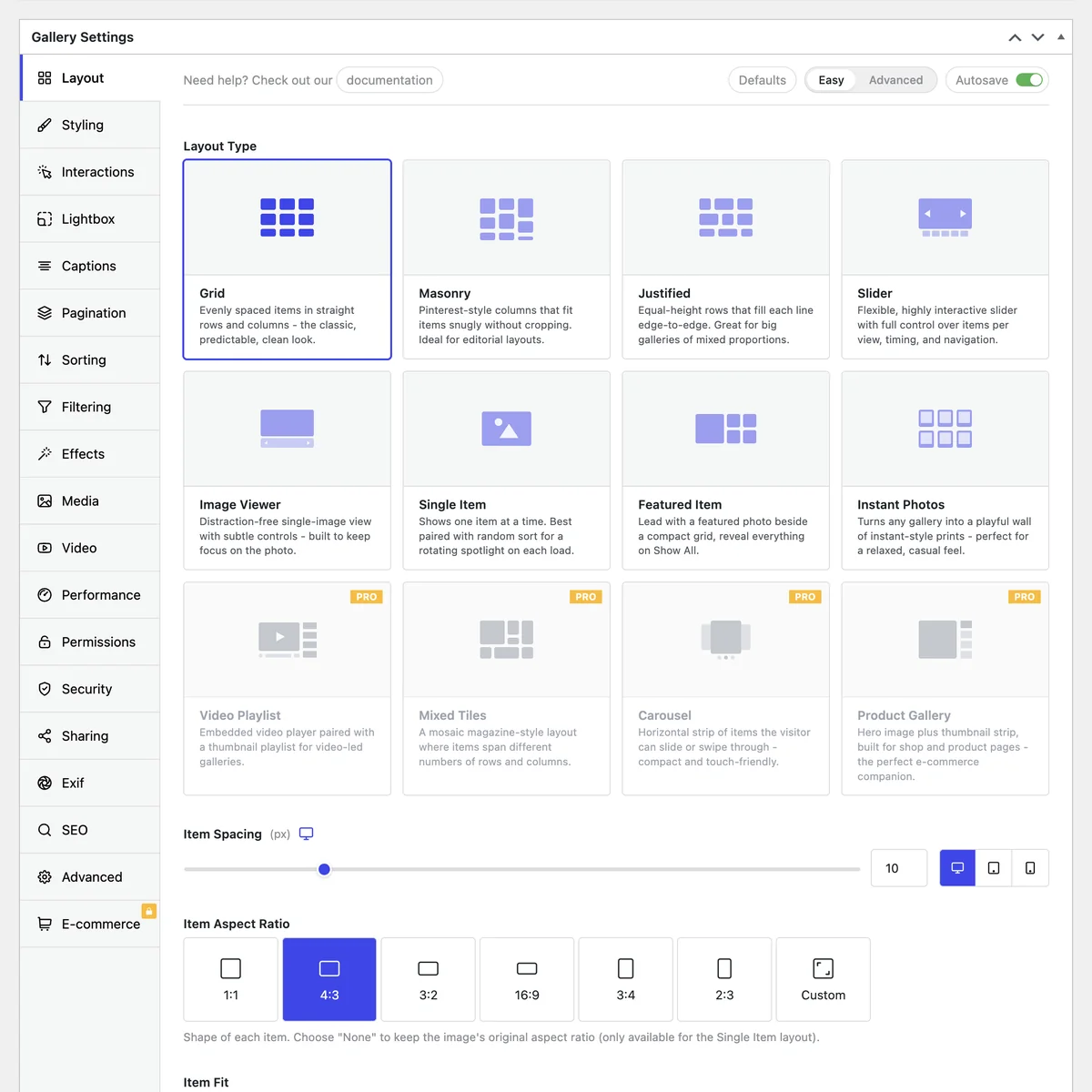
Choosing a layout
FotoGrids
Eight layouts in Free, grid and slider among them
FooGallery
Grid and slider begin at PRO Starter, $39.99 a year
Styling what you built
FotoGrids
Image filters, hover effects and colour controls in Free
FooGallery
Image filters begin at PRO Starter, $39.99 a year
Letting visitors filter
FotoGrids
Filtering in Free, advanced filtering in Pro Starter
FooGallery
Filtering begins at PRO Expert, $79.99 a year
FotoGrids template library showing gallery presets including Clean Grid, Framed Portfolio, Natural Flow and Hero Slider, each with preview and apply buttons
No-code design

Thirty templates or a blank gallery

FooGallery’s free plugin starts every gallery from defaults — there is no template library in it.

FooGallery — Every gallery starts from defaults

A clean starting point if you know exactly what you want, and a slow one if you don't, particularly for the third gallery of the month.

FotoGrids — 30+ templates in Free

Pick one close to the job, change the parts that matter, publish. Pro raises it to 70+. It is the difference between an evening and a weekend.

Plans and tiers

The add-on that isn't in any plan

FooGallery’s ladder is Starter at $39.99, Expert at $79.99 and Commerce at $109.99 — clear, and honest about renewals.

FooGallery — Some pieces sit outside the ladder

Social sharing is an $89.99 add-on that no PRO plan includes, so the top tier plus social costs more than the top tier. Grid and slider are Starter, filtering and video Expert, watermarking Commerce.

FotoGrids — Nothing sold beside the ladder

Grid, slider, image filters, social sharing, basic filtering and textual watermarking are all in Free. Each paid tier contains everything below it.

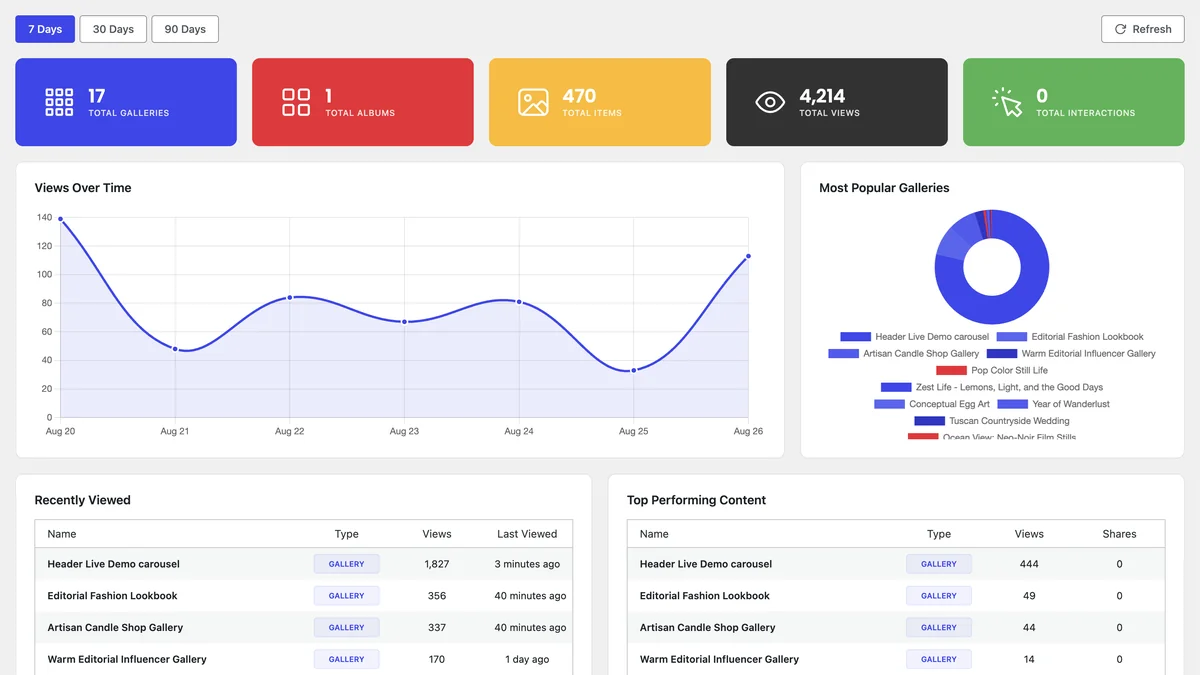
FotoGrids gallery analytics dashboard with total views, a views-over-time chart, and a top performing content table
Engagement analytics

A gallery you can't measure is a guess

Which album gets opened. Which photograph people stop on. Whether last month’s gallery was worth the afternoon it took.

FooGallery — No analytics at any tier

There is no analytics in the free plugin, and none in Starter, Expert or Commerce either. The answer is a separate analytics tool and a wiring job.

FotoGrids — In the free plugin

Views, top-performing content and sharing activity, per gallery, in the same screen you built it in. Pro Plus adds traffic sources, devices and behaviour.

In fairness

Credit where it's due

Two things FooGallery does well, and we are not going to pretend otherwise.

FooGallery — A strong lightbox and real optimisation

Its free lightbox is excellent and completely ungated. The free build also ships a ShortPixel engine that optimises images and offloads them to a CDN. And its prices are list prices, with no first-year discount.

FotoGrids — What surrounds them

Eight layouts rather than one paid tier's worth, templates to start from, watermarking without reaching the $109.99 tier, and a dashboard that tells you whether any of it worked.

fg-synced-media-slide
Feature by feature

What FooGallery puts behind a licence

FooGallery’s prices are list prices with no first-year discount — one of the few in this category that doesn’t do that.
Feature
FotoGrids
FooGallery
Templates Library
Free
None in the free plugin
Grid Layout
Free
PRO Starter — $39.99/yr
Slider Layout
Free
PRO Starter — $39.99/yr
Image Filters
Free
PRO Starter — $39.99/yr
Filtering
Free
PRO Expert — $79.99/yr
Video
Free
PRO Expert — $79.99/yr
Tags, People & Locations
Free
PRO Expert — $79.99/yr
EXIF Data
Free
PRO Expert — $79.99/yr
Analytics Dashboard
Free
Not offered at any tier
Views Tracking
Free
Not offered at any tier
Social Sharing
Free
Social add-on — $89.99/yr, in no PRO plan
Watermarking
Free
PRO Commerce — $109.99/yr
Migration

Move from FooGallery in an afternoon

Step 1
Bring the galleries across
FotoGrids imports from FooGallery and other gallery plugins, so the galleries you have already built don’t need rebuilding.
Step 2
Keep the URLs
Galleries get their own addresses, and the permalink settings let you match the URLs you already have on FooGallery.
Step 3
Try it alongside
Free is a full plugin, not a trial. Build one gallery in FotoGrids beside your FooGallery one and compare on your own site.
Step 4
Make it yours
Pick one of the 30+ templates, set it the way you like, then save it as a default for the next gallery.

Frequently asked questions

Yes, and specifically for the parts FooGallery charges for or doesn’t cover. Grid and slider layouts, image filters, social sharing, watermarking, 30+ templates and an analytics dashboard are all in the free plugin.
Mostly measurement and starting speed. FooGallery has no analytics at any tier and no template library, so you build from defaults and then guess at the result. FotoGrids Free answers both in the same screen you build in.
Eight layouts, 30+ templates, albums and collections, twelve hover effects, textual watermarking, password-protected galleries, EXIF viewing and the analytics dashboard. The full breakdown is on the Free vs Pro page.
The same as this year. Pro Starter, Pro Plus and Pro Agency are $39, $79 and $129, and those are the renewal prices as well as the joining ones. The tiers are set out on the pricing page.
We read each plugin’s actual source rather than its marketing pages, then run a second pass whose job is to disprove every claim. The method is in the methodology section, and every line in the table has a source behind it.