Explore everything FotoGrids can do
Style every gallery to your brand
Drag, drop, publish. No code
Rank higher. Load lighter
Your photos stay your photos
Track. Engage. Grow
Native block for the WordPress editor
Dedicated widget with full control
Custom module for any Divi layout
Fully customizable native element
Anywhere WordPress renders
Read, write, and automate galleries
Customize behavior with WP hooks
Bring your own styles and scripts
Hooks, REST API, and full control
Showcase your work beautifully
Collaborate, deliver, and scale client work
Beautiful galleries without writing code
Turn visitors into paying customers
Product galleries built to sell
Creative portfolios for every field
Curated video playlists and embeds
Conferences, weddings and celebrations
E-Commerce-ready product showcases
Property photos that close deals
Client proofing with secure galleries

Publishing work online means giving people a way to see it. It should not mean giving them a way to take it. FotoGrids layers watermarking, access rules and permissions so you decide who sees what — and who can do anything with it.
Your name or logo sits on the displayed image, so a copied file still carries your credit. Choose diagonal, tiled, corner or full coverage — originals untouched.
Disabling right-click and drag stops the casual save — the one that happens without thinking. It will not stop someone determined, and we would rather say so.
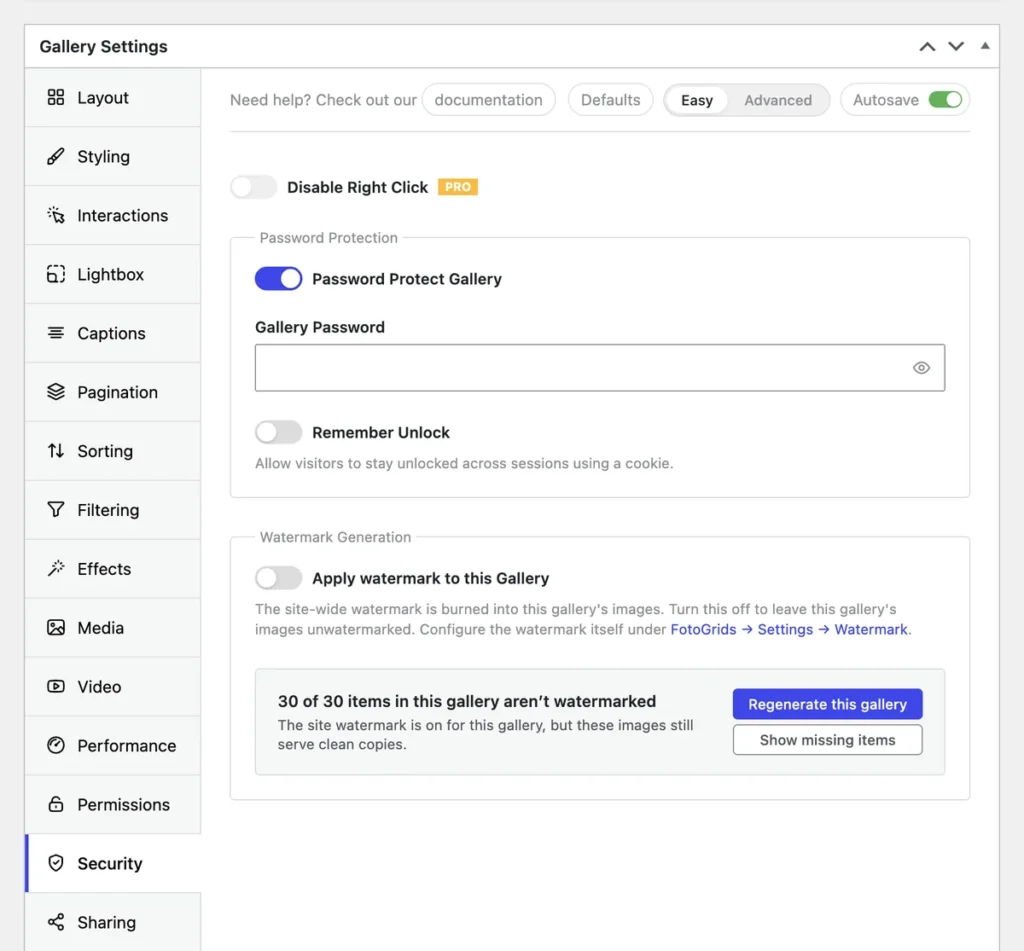
Password-protect a gallery so only the people you sent the password to get in. The normal case for client work, unreleased campaigns and anything not public yet.
User permissions set view and edit rights per gallery or album. The Permissions Manager adds fine-grained global control across galleries, albums and settings.
A searchable activity log records edits, permission changes, approvals and deletions. When several people share galleries, "who changed this" is not a guess.
Diagonal across the frame, tiled edge to edge, tucked in a corner, or covering the whole image for the galleries that need it.
The watermark is applied to what gets displayed. Your master file in the media library is never overwritten, so you can change or remove the mark at any time.
A public portfolio can carry a heavy mark while a client proofing gallery carries a light one — or none, once they have paid.
The usual ways of sending work for approval both have a cost: a WordPress account gives someone access to your site, and a file-sharing link gives away the files. A token link does neither.
When a token link is more than you need, a password on the gallery is in the free plugin and takes one field.
Clients review, comment and approve through a secure link. No WordPress account is created, so approving never means site access.
Set an expiry, add a password if it matters, and the link closes itself on the date you chose, with no clean-up left to do.
Decide whether a gallery can be downloaded, at what resolution, and by whom — so proofs stay proofs until the work is signed off.
A password on a gallery answers “can they see it”. It does not answer “who deleted the client’s selects on Tuesday”. That question needs a different tool. Agency tier features:
Roles and access levels assigned gallery by gallery, so a retoucher sees the shoot they are working on and not the client's other projects.
Every meaningful action recorded and searchable — edits, permission changes, approvals, deletions — with who did it and when.
Because the honest answer to an accidental deletion should be "restore it", not "rebuild it".
Yes — anything a browser can display can be captured, and no plugin changes that. What these features do is remove the effortless routes, put your credit on what does get taken, and control who reaches the gallery in the first place.
No. The watermark is applied to the version that gets displayed. Your uploaded file stays in the media library exactly as it was, so you can change the mark, move it, or remove it later without re-uploading anything.
Per gallery, so one client’s gallery can be locked while your public portfolio stays open. Permissions can also be set per album, and the Pro Plus Permissions Manager handles the same rules globally when there are too many to repeat by hand.
Not with the Agency proofing links. Clients open a secure token link, make their selections and approve — no account is created and no site access is granted. For simpler cases, a password-protected gallery in the free plugin covers it.
Meaningful actions rather than every page view — edits, permission changes, approvals and deletions, with the person and the timestamp, all searchable. It is an Agency feature, aimed at teams where more than one person can change the same gallery.
Watermarking, password-protected galleries and per-gallery user permissions are all in the free plugin. Right-click blocking is Pro, the global Permissions Manager and secure downloads are Pro Plus, and expiring links, proofing, team permissions and the audit trail are Agency.
Watermarking, password galleries and permissions are in the free plugin. Set them on the first gallery rather than after the first time something is taken.
We use cookies and similar technologies to make our website work smoothly and understand how it’s used. Choosing “Accept” helps us personalize your experience. If you decline or change your mind later, some features may not work as expected.